calm
   tech

Our world is made of information that competes for our attention. What is necessary? What is not?

When we design products, we aim to choose the best position for user interface components, placing the most important ones in the most accessible places on the screen.

Equally important is the design of communication. How many notifications are necessary? How and when should they be displayed? To answer this, we can be inspired by the principles of calm technology.1

Principles of Calm Technology

Developed by Amber Case


  1. Technology should require the smallest possible amount of attention
    1. Technology can communicate, but doesn't need to speak.
    2. Create ambient awareness through different senses.
    3. Communicate information without taking the user out of their environment or task.
  2. Technology should inform and create calm
    1. A person's primary task should not be computing, but being human.
    2. Give people what they need to solve their problem, and nothing more.
  3. Technology should make use of the periphery
    1. A calm technology will move easily from the periphery of our attention, to the center, and back.
    2. The periphery is informing without overburdening.
  4. Technology should amplify the best of technology and the best of humanity
    1. Design for people first.
    2. Machines shouldn't act like humans.
    3. Humans shouldn't act like machines.
    4. Amplify the best part of each.
  5. Technology can communicate, but doesn't need to speak
    1. Does your product need to rely on voice, or can it use a different communication method?
    2. Consider how your technology communicates status.
  6. Technology should work even when it fails
    1. Think about what happens if your technology fails.
    2. Does it default to a usable state or does it break down completely?
  7. The right amount of technology is the minimum needed to solve the problem
    1. What is the minimum amount of technology needed to solve the problem?
    2. Slim the feature set down so that the product does what it needs to do and no more.
  8. Technology should respect social norms
    1. Technology takes time to introduce to humanity.
    2. What social norms exist that your technology might violate or cause stress on?
    3. Slowly introduce features so that people have time to get accustomed to the product.
    4. Leverage familiar behaviors to introduce new ones.

Examples


Tea kettle

Tea Kettle

If a technology works well, we can ignore it most of the time. A teapot tells us when it is ready, and is off or quiet the rest of the time. A tea kettle can be set and forgotten, until it sings.

Inner office window

Inner Office Window

An inner office window provides an understanding of whether someone is busy or not without the need to interrupt them.

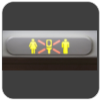
Lavatory sign

Lavatory Sign

This simple display easily allows one to see whether the restroom on a plane is occupied or not. The message is universal and requires no translation.

Roomba

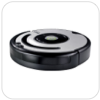
Roomba Vacuum Cleaner

Roomba doesn't have a spoken language, just simple tones. This tone-based language makes it easy for anyone to understand what Roomba is saying.

Roomba chirps happily when a task is finished. When Roomba gets stuck, the device emits a somber tone. Orange and green status lights help communicate status in an unambiguous way.

Sleep Cycle

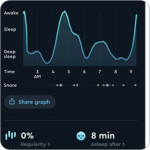
Sleep Cycle

Sleep Cycle monitors your sleep and wakes you up at the best place in your sleep cycle with a soft noise or buzz. Because the haptic alert occurs under your pillow, you can wake up without anyone else being affected.

Smart badge

Smart Badge

Smart badges are small, wearable technologies that don't require a charger, user interface or operating system. Simply touch a provisioned smart badge to a door or elevator panel and you'll easily gain access.

Floor navigation

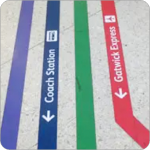
Floor Navigation System with Icons

Floor navigation, when done well, can quietly show people where to go in unfamiliar spaces. Using Bauhaus iconography alongside text helps with quick mental parsing of directions.

Calm Communication

Haptic alert

Haptic Alert

Touch has a high resolution of human sensation. Information can be conveyed with no visual or auditory requirement.

Trend graph

Trend Graph

A good trend graph makes the formerly invisible visible, compressing long-term data into an easily accessible format.

Status light

Status Light

A light that shows the weather is far more calm than a weather system that constantly calls attention to itself.

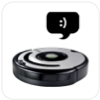
Status tone

Status Tone

A status tone is a quick way for a device to let a person know whether it needs attention or not.

Status shout

Status Shout

Smoke alarms, tea kettles and microwaves all use shouts to alert people to their status. Ambulances use Status Shouts to make way for an emergency.

Popup

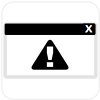
Popup

Popup alerts are the most common form of alert, but they can quickly overwhelm people when not used correctly.

Timed trigger

Timed Trigger

A simple status light on a timer can make for a calm and informative notifier.

Delay

Delay

Use a delay or interrupt during a change of state. When headphones become disconnected, the music player automatically pauses.


Presentation

Amber Case at FutureSpaces in May 2024.


Calm Tech Institute

Calm Tech Institute Logo

Visit the Calm Tech Institute Website! Launched May 2024.


References

1. Zampieri, Ornella. "Customer Intimacy and Calm Technology." Wolters Kluwer. 07 Oct. 2011.

2. Symonds, Paul. "Colour Coding Signage for Easier Navigation." Wayfinding. 14 May 2023.

On This Page

Our world is made of information that competes for our attention. What is necessary? What is not?

When we design products, we aim to choose the best position for user interface components, placing the most important ones in the most accessible places on the screen.

Equally important is the design of communication. How many notifications are necessary? How and when should they be displayed? To answer this, we can be inspired by the principles of calm technology.1

Principles of Calm Technology

Developed by Amber Case


  1. Technology should require the smallest possible amount of attention

    • Technology can communicate, but doesn't need to speak.
    • Create ambient awareness through different senses.
    • Communicate information without taking the user out of their environment or task.
  2. Technology should inform and create calm

    • A person's primary task should not be computing, but being human.
    • Give people what they need to solve their problem, and nothing more.
  3. Technology should make use of the periphery

    • A calm technology will move easily from the periphery of our attention, to the center, and back.
    • The periphery is informing without overburdening.
  4. Technology should amplify the best of technology and the best of humanity

    • Design for people first.
    • Machines shouldn't act like humans.
    • Humans shouldn't act like machines.
    • Amplify the best part of each.
  5. Technology can communicate, but doesn't need to speak

    • Does your product need to rely on voice, or can it use a different communication method?
    • Consider how your technology communicates status.
  6. Technology should work even when it fails

    • Think about what happens if your technology fails.
    • Does it default to a usable state or does it break down completely?
  7. The right amount of technology is the minimum needed to solve the problem

    • What is the minimum amount of technology needed to solve the problem?
    • Slim the feature set down so that the product does what it needs to do and no more.
  8. Technology should respect social norms

    • Technology takes time to introduce to humanity.
    • What social norms exist that your technology might violate or cause stress on?
    • Slowly introduce features so that people have time to get accustomed to the product.
    • Leverage familiar behaviors to introduce new ones.

Examples

7 examples

Products and patterns that embody calm technology principles.


Tea kettle
Ambient Alert
Tea Kettle

If a technology works well, we can ignore it most of the time. A teapot tells us when it is ready, and is off or quiet the rest of the time. A tea kettle can be set and forgotten, until it sings.

Inner office window
Peripheral Display
Inner Office Window

An inner office window provides an understanding of whether someone is busy or not without the need to interrupt them.
Lavatory sign
Binary Indicator
Lavatory Sign

This simple display easily allows one to see whether the restroom on a plane is occupied or not. The message is universal and requires no translation.
Roomba
Status Tone
Roomba Vacuum Cleaner

Roomba doesn't have a spoken language, just simple tones. This tone-based language makes it easy for anyone to understand what Roomba is saying.

Roomba chirps happily when a task is finished. When Roomba gets stuck, the device emits a somber tone. Orange and green status lights help communicate status in an unambiguous way.
Sleep Cycle
Haptic + Trend
Sleep Cycle

Sleep Cycle monitors your sleep and wakes you up at the best place in your sleep cycle. Because the haptic alert occurs under your pillow, you can wake up without anyone else being affected.

Smart badge
Zero-UI
Smart Badge

Smart badges are small, wearable technologies that don't require a charger, user interface or operating system. Simply touch one to a door or elevator panel for access.
Floor navigation
Wayfinding
Floor Navigation System with Icons

Floor navigation, when done well, can quietly show people where to go in unfamiliar spaces. Using Bauhaus iconography alongside text helps with quick mental parsing of directions.

Calm Communication

8 patterns

Products communicate through many channels. The choice of channel determines how much attention a message demands.


Haptic Alert

Touch has a high resolution of human sensation. Information can be conveyed with no visual or auditory requirement.

Trend Graph

A good trend graph makes the formerly invisible visible, compressing long-term data into an accessible format.

Status Light

A light that shows the weather is far more calm than a weather system that constantly calls attention to itself.
Status Tone

A status tone is a quick way for a device to let a person know whether it needs attention or not.

Status Shout

Status Shouts should be reserved for very important information. Smoke alarms, tea kettles and ambulances all use them.
Popup

Popup alerts are the most common form of alert, but they can quickly overwhelm people when not used correctly.

Timed Trigger

A simple status light on a timer can make for a calm and informative notifier.

Delay

Use a delay or interrupt during a change of state. When headphones disconnect, the music player automatically pauses.

Presentation


Amber Case at FutureSpaces, May 2024.

Calm Tech Institute


Calm Tech Institute logo

A standards body whose purpose is changing the way we design and bring technologies into the world. Launched May 2024.

Visit the Calm Tech Institute →

References


1. Zampieri, Ornella. "Customer Intimacy and Calm Technology." Wolters Kluwer. 07 Oct. 2011.

2. Symonds, Paul. "Colour Coding Signage for Easier Navigation." Wayfinding. 14 May 2023.

View: