Pie Menus
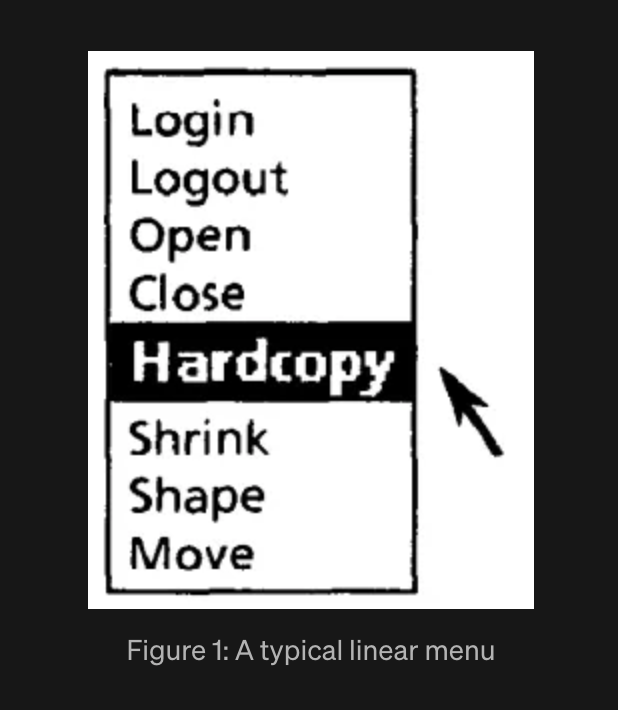
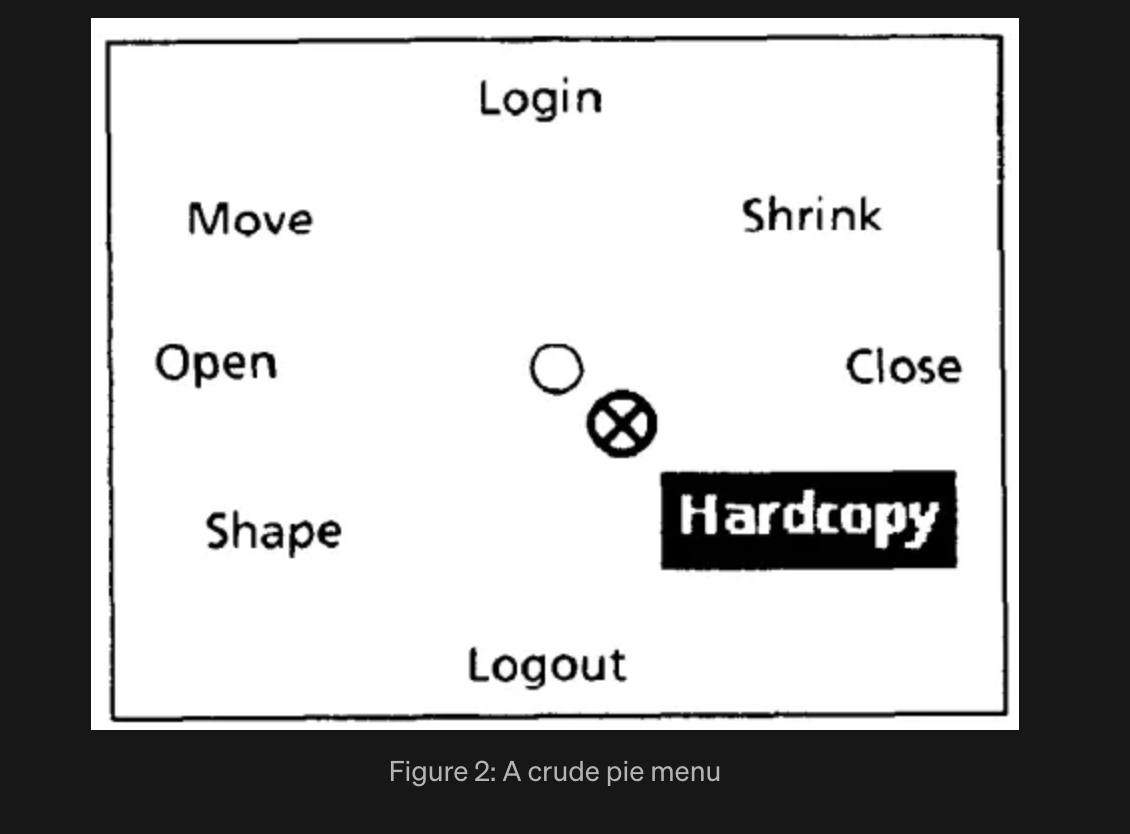
Pie menus arrange choices around a circle instead of stacking them top to bottom. The user clicks at the center and drags outward in any direction to select. Because all items are equidistant from the cursor's starting point, selection time stays roughly constant regardless of which item the user wants. In a conventional linear menu, items near the bottom take measurably longer to reach.
The concept was implemented by Don Hopkins at the University of Maryland and Xerox PARC. The key empirical study was published at ACM CHI in 1988 by Jack Callahan, Don Hopkins, Mark Weiser, and Ben Shneiderman. Weiser, who led the Computer Science Lab at PARC, went on to articulate the vision of ubiquitous computing and calm technology. Shneiderman, at Maryland, had already established the field of direct manipulation interfaces.
Why pie menus are faster
The advantage comes from Fitts's Law, which models the time to move a pointer to a target as a function of distance and target size:
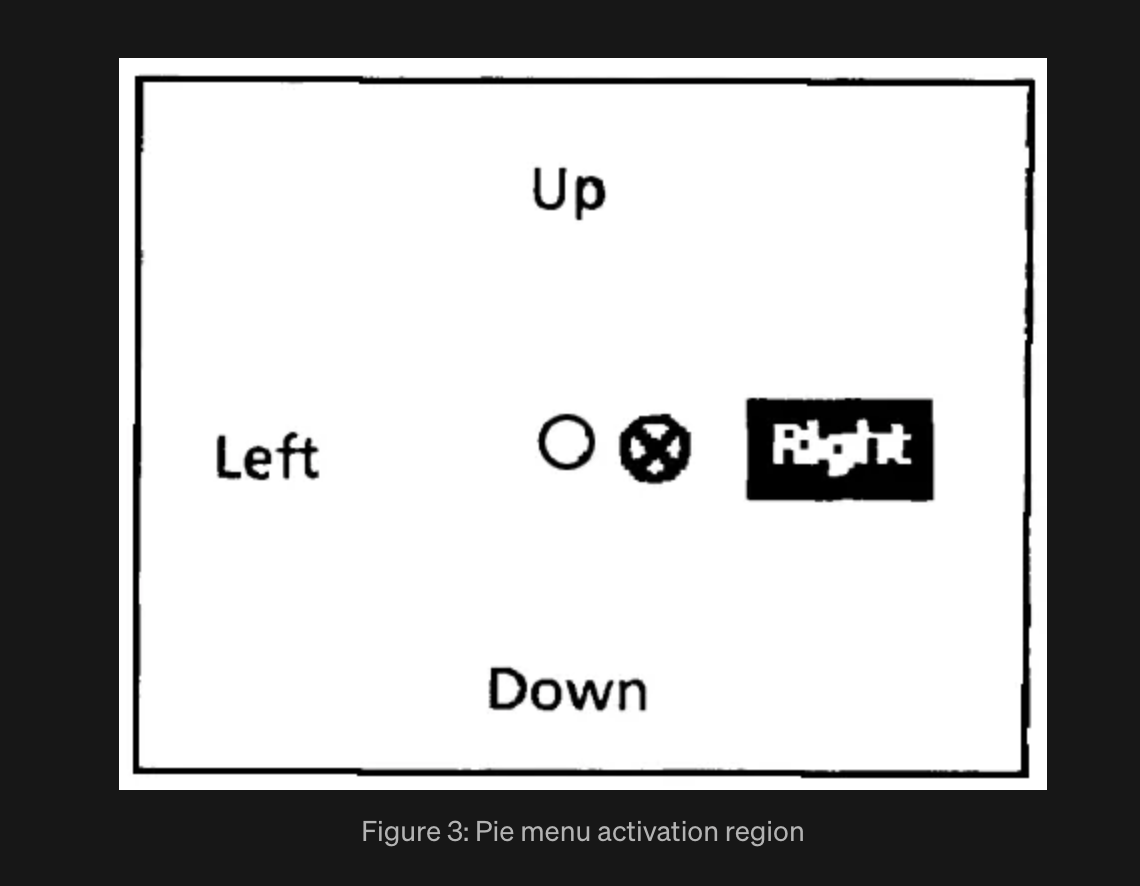
In a pie menu, distance (D) is fixed and short for every item, while the wedge-shaped activation region makes the target size (S) large. In the 1988 experiment, pie menu activation regions were 3,500 to 6,000 square pixels, roughly two to three times the size of linear menu regions (1,000 to 2,000 square pixels). The distance from center to any activation region was 10 pixels. For linear menus, distance ranged from 13 to 200 pixels.
In a controlled experiment with 33 subjects, pie menus were approximately 15 percent faster than linear menus. The difference was statistically significant (p < 0.01). Error rates were marginally lower with pie menus (p = 0.087). Subjects were roughly split on subjective preference, though those who preferred linear menus reported weaker convictions and said they expected to prefer pie menus with more practice.
Pie menus also reduce cursor drift. When a linear menu is dismissed, the cursor sits wherever the user released the mouse, which tends to be near the bottom of the screen after repeated use. With pie menus, the cursor returns to roughly the center of the menu's location, keeping it close to where the user needs it next.
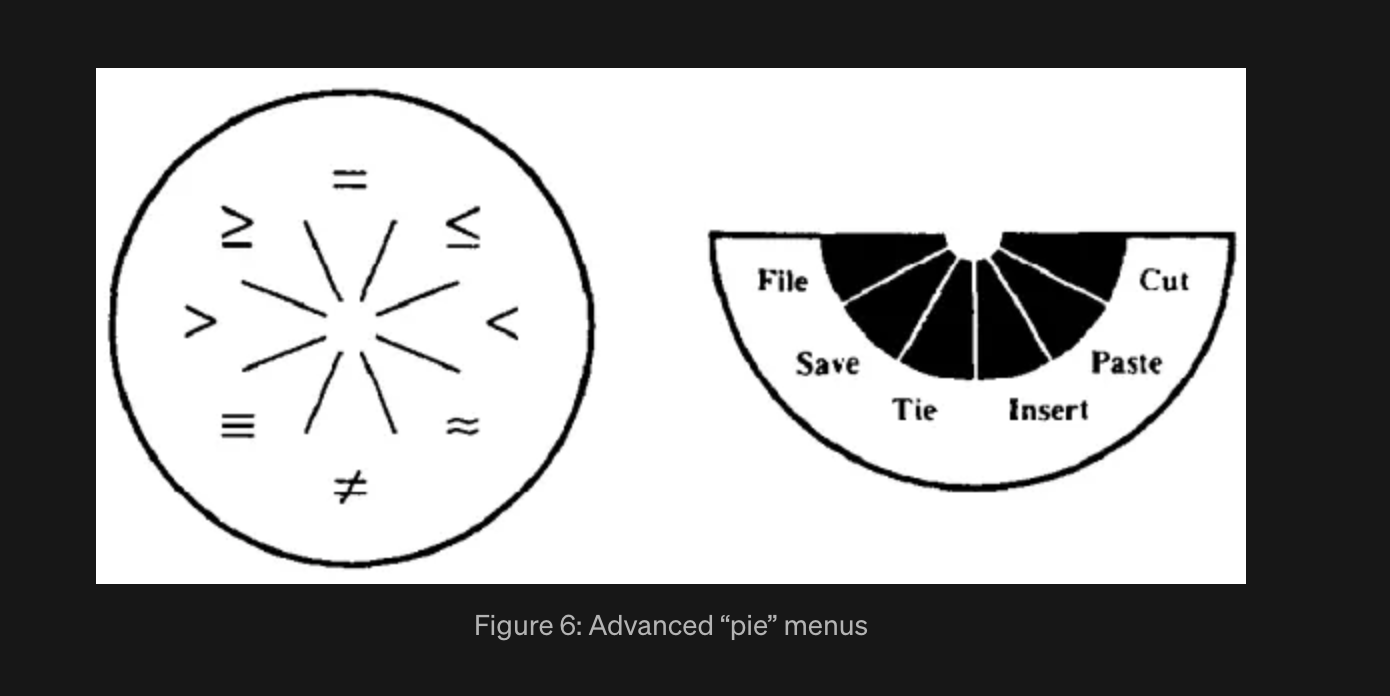
Figures from the 1988 paper
Pie menus in software
Hopkins first built pie menus for the X Window System and then for Sun Microsystems' NeWS window system in the late 1980s. The concept has since appeared across games, design tools, mobile platforms, and operating systems.
Games
Secret of Mana (1993) introduced an icon-based ring menu system that became a template for later RPGs. Players opened a radial ring to switch weapons, cast spells, or use items without pausing the action.
The Sims (2000) used pie menus as its primary interaction method. Clicking on any object or character opened a radial menu of context-sensitive actions: talk, hug, insult, cook, sleep. The pie menus were programmed by Don Hopkins, one of the original pie menu researchers from the 1988 CHI paper. Hopkins had previously implemented pie menus for the X Window System, NeWS, and SimCity, and later wrote a 30-year retrospective on the concept. He also wrote the chapter "Natural Selection: The Evolution of Pie Menus" in Game Programming Gems 3 (2002). The Sims franchise sold over 200 million copies, making this the most widely seen pie menu implementation. The Sims 4 still uses pie menus today, and the modding community has built extensive pie menu reorganization mods to manage the growing number of interaction options.
Counter-Strike: GO used a radial buy wheel for purchasing weapons and equipment between rounds. Players navigated nested radial categories (pistols, rifles, grenades) with mouse gestures. CS2 replaced it with a grid layout in 2023, generating community debate.
Grand Theft Auto V uses a weapon wheel accessed by holding a button and flicking the analog stick. The radial layout maps directly to stick direction, which is the console-controller equivalent of a pie menu.
Mass Effect and other BioWare games use the "dialogue wheel," a patented radial menu for selecting conversation responses. The position on the wheel (top-right for friendly, bottom-right for aggressive) encodes tone as well as content.
Design and 3D tools
Autodesk Maya uses marking menus (a variant of pie menus developed by Gord Kurtenbach at Alias Research). Hold a hotkey, flick in a direction, release. Experienced users execute the gesture without the menu ever becoming visible, relying on muscle memory alone.
Blender added official pie menus as an optional feature in version 2.72 (2014). Hotkeys like Z (shading mode) and Tab (mode switch) open radial selectors. A large ecosystem of third-party pie menu add-ons exists, including full custom pie menu editors.
SolidWorks uses a radial context menu (the "mouse gestures" feature) for common modeling operations. Swipe in a direction from a right-click to trigger the assigned command.
Mobile and consumer electronics
Samsung Galaxy Note / S Pen Air Command launched with the Galaxy Note 3 in 2013. Removing the S Pen or pressing its button opens a radial menu of up to ten shortcuts (notes, screen capture, translate, magnify). The menu fans out from a floating icon and is customizable.
Android 3.0 Honeycomb (2011) used a radial app switcher and a semicircular system bar for tablet navigation. Google also patented a pinch-to-open radial menu concept for future Android versions.
Second Life used pie menus as its primary context menu in the classic viewer. Right-clicking any object opened a radial menu of actions (sit, touch, edit, take, pay). The pie menu was removed in the Viewer 2 redesign and later restored as an option after user complaints.
Virtual worlds and VR
Second Life used pie menus as its primary context menu in the classic viewer. Right-clicking any object opened a radial menu of actions (sit, touch, edit, take, pay). The pie menu was removed in the Viewer 2 redesign and later restored as an option after user complaints.
Anyland, a VR sandbox world by Philipp Lenssen (also creator of Manyland), uses a different approach. Its creation tools appear as a flat panel menu attached to the controller's thumb button, not a radial layout. The menu lists geometric shapes, scripting options, and avatar parts in a vertical panel that floats at the player's hand. This is closer to a hand-referenced list menu than a pie menu, though the VR context and the thumb-activated trigger share the same design goal: keep the interface attached to the hand rather than fixed in world space, so the user never has to reach for a toolbar.
VR research has continued to test pie menus against list and grid layouts in immersive environments. A 2017 study at ISS (Interactive Surfaces and Spaces) found that radial menus produced shorter task completion times than linear menus in VR, consistent with the original 1988 findings, though users still reported a subjective preference for traditional panel layouts. The pie menu's advantage in VR is the same as on desktop: fixed distance, large angular targets, and compatibility with directional input (thumbstick or wrist rotation).
Most widely adopted
Three implementations stand out for reach and influence. The Sims (2000) brought pie menus to the largest audience, with over 200 million franchise copies sold. Every player interaction in the game passes through a radial menu. Maya marking menus (developed by Gord Kurtenbach at Alias Research, now Autodesk) became the standard for expert 3D workflow; power users execute gestures without the menu ever rendering, selecting by muscle memory and direction alone. GTA V's weapon wheel (2013) became the template that most open-world and action games now follow for inventory and weapon selection on console controllers, where the analog stick maps naturally to radial direction.
Physical dials: pie menus you can touch
The pie menu's radial layout translates directly to a physical rotary dial. A ridged knob with detent positions maps one-to-one onto wedge-shaped menu sectors on a screen. Turn the dial to highlight a sector; press to confirm. The menu stays visible the whole time. The ridges give tactile feedback at each detent, so the operator knows how many positions have been passed without looking down.
RATP Paris Métro ticket machines
The older green RATP ticket machines in the Paris Métro used a large ridged scroll wheel (molette) set into the front panel. The display showed stations or ticket types, and the rider turned the wheel to highlight a selection, then pressed a green validate button to confirm. The detent clicks corresponded to each menu item. The interaction worked with gloves, in a hurry, and for riders who did not speak French, because the wheel's response on screen was self-explanatory. The current Île-de-France Mobilités machines (the purple replacements) still include a scroll wheel alongside a touchscreen.
BMW iDrive
BMW's iDrive system, introduced in the 2001 7 Series (E65), arranged menu items in an eight-point compass layout on the display, controlled by a console-mounted rotary knob that could rotate, tilt in four directions, and press to select. The interface was widely criticized for complexity, and BMW gradually simplified it, first cutting the eight-point compass to four directions, then replacing the radial layout with a conventional list. The rotary controller itself remained through seven generations of iDrive before BMW announced in 2026 that iDrive X would drop the physical dial entirely.
Cadillac CUE rotary controller
Cadillac's rotary infotainment controller was added to the XT4, CT4, CT5, and Lyriq after the original CUE system was widely criticized for relying entirely on capacitive touch panels. The knob sits where the hand naturally falls on the center console and supports rotation, jog (tilt in four directions), and press to select. The Lyriq pairs it with a 33-inch curved OLED display.
Apple iPod click wheel
The original iPod (2001) had a mechanical scroll wheel that physically rotated with ridged detents. Apple replaced it with a touch-sensitive click wheel in the iPod Mini (2004). The four fixed labels on the ring (Menu, Forward, Back, Play/Pause) formed a persistent set of transport controls at cardinal positions. The center button confirmed the current selection from the on-screen list. The physical input was rotary, though the display was a vertical list rather than a pie layout. Hopkins himself has noted that the iPod dial is "definitely not a pie menu, just because it's round," since the on-screen feedback is a linear list, not a radial layout. The distinction matters: a pie menu requires both radial input and radial display. The click wheel is a rotary input device that drives a linear menu, with four fixed shortcut positions arranged radially on the hardware.
Citroën and DS Automobiles
French carmakers took a different position on physical controls. Thierry Métroz, chief designer at DS Automobiles (the luxury division of Citroën), argued publicly against the industry's move to touchscreen-only dashboards. Citroën's dashboard history runs from the single-spoke steering wheel and "cyclops eye" speedometer of the 1955 DS, through the satellite controls of the GSA and CX, to the 1985 BX Digit, the first production car with a fully digital instrument display. The design philosophy across these was consistent: put controls where the hand already is, and make the interface legible at a glance.
The ridged rotary dial with a persistent circular display is the physical embodiment of a pie menu. The dial's detent positions correspond to the wedge boundaries. Radial distance from center is eliminated entirely, because the selection mechanism is rotation, not translation. The only remaining variable in Fitts's Law is the angular distance between the current position and the target, and the detents make that distance countable by feel.
Weiser and calm technology
Mark Weiser co-authored the 1988 pie menus paper while leading the Computer Science Laboratory at Xerox PARC. Three years later, in 1991, he published "The Computer for the 21st Century" in Scientific American, laying out the vision of ubiquitous computing. His later work with John Seely Brown introduced the term "calm technology" to describe systems that inform without demanding attention. The Calm Tech Institute continues this line of work, developing certification standards for products and spaces that respect human attention. See calmtech.com for the principles.
References
Callahan, J., Hopkins, D., Weiser, M., and Shneiderman, B. "An Empirical Comparison of Pie vs. Linear Menus." Proceedings of the SIGCHI Conference on Human Factors in Computing Systems (CHI '88), ACM, 1988, pp. 95-100.
Hopkins, D., Callahan, J., and Weiser, M. "Pies: Implementation, Evaluation and Application of Circular Menus." University of Maryland Computer Science Department Technical Report, 1988.
Weiser, M. "The Computer for the 21st Century." Scientific American, September 1991.
Weiser, M. and Brown, J.S. "The Coming Age of Calm Technology." Xerox PARC, 1996.
Card, S.K., Moran, T.P., and Newell, A. The Psychology of Human-Computer Interaction. Lawrence Erlbaum, 1983.
Shneiderman, B. Designing the User Interface. Addison-Wesley, 1987.